A directory of suppliers and vendors - contact details, account numbers and notes - plus
a price-comparison log that lines up every supplier's quoted price for the same item side
by side, cheapest first, so the best deal is obvious without a spreadsheet.
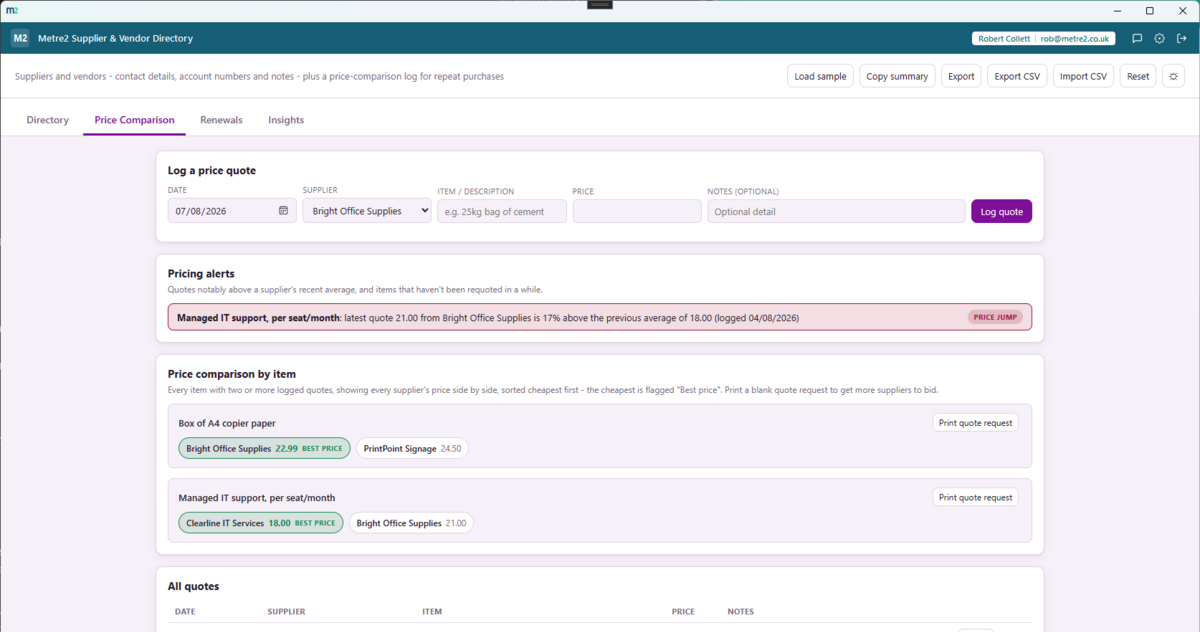
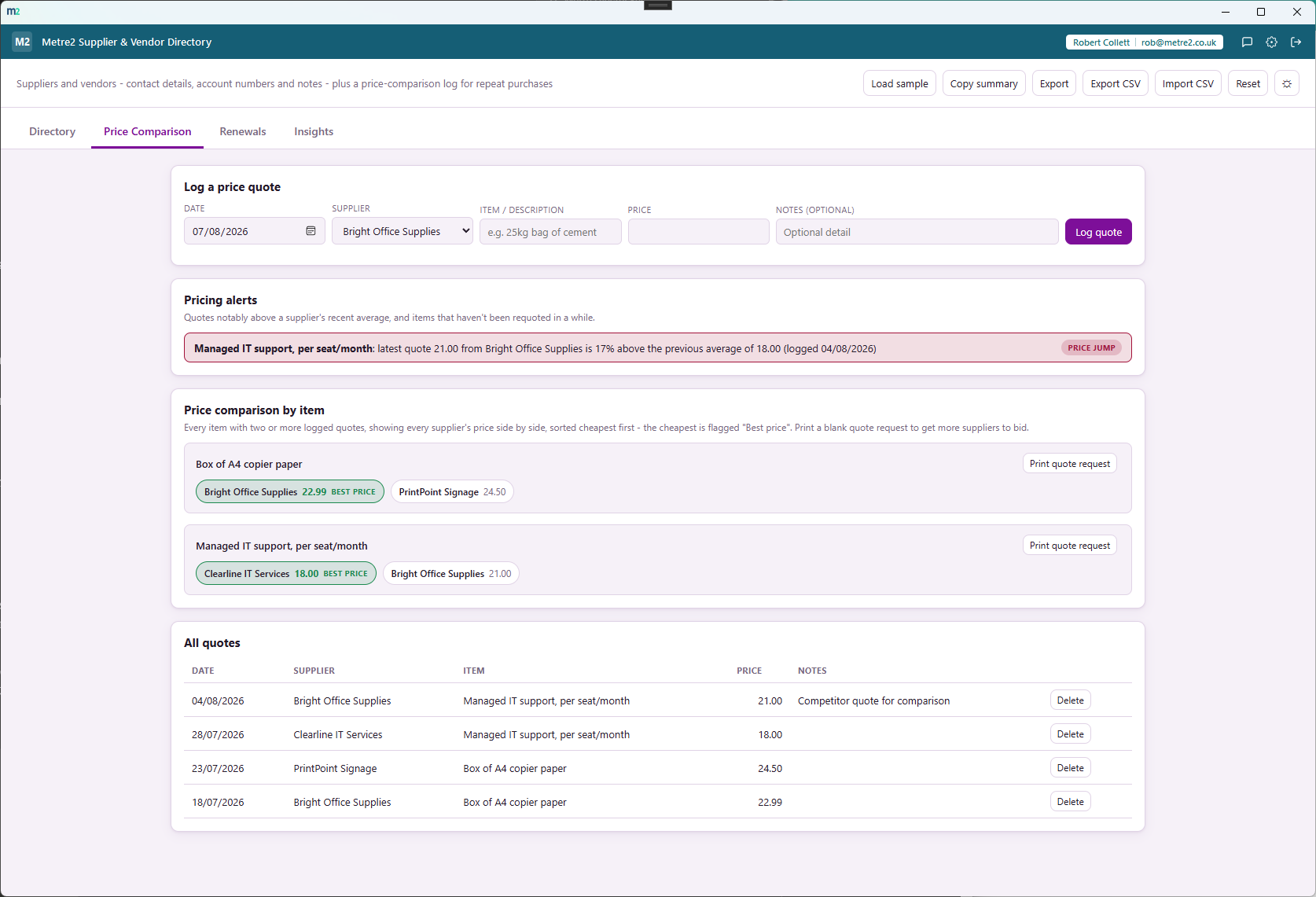
Every item with two or more logged quotes gets a row of chips - one per supplier,
sorted cheapest first, the best price clearly flagged - a direct comparison, not a
chart you have to interpret.
Eight categories, plus your own
Materials, Equipment/Plant Hire, Subcontractor, Professional Services, Utilities,
IT/Software and Office Supplies cover the common ones - type a free-text "Other" for
anything that doesn't fit.
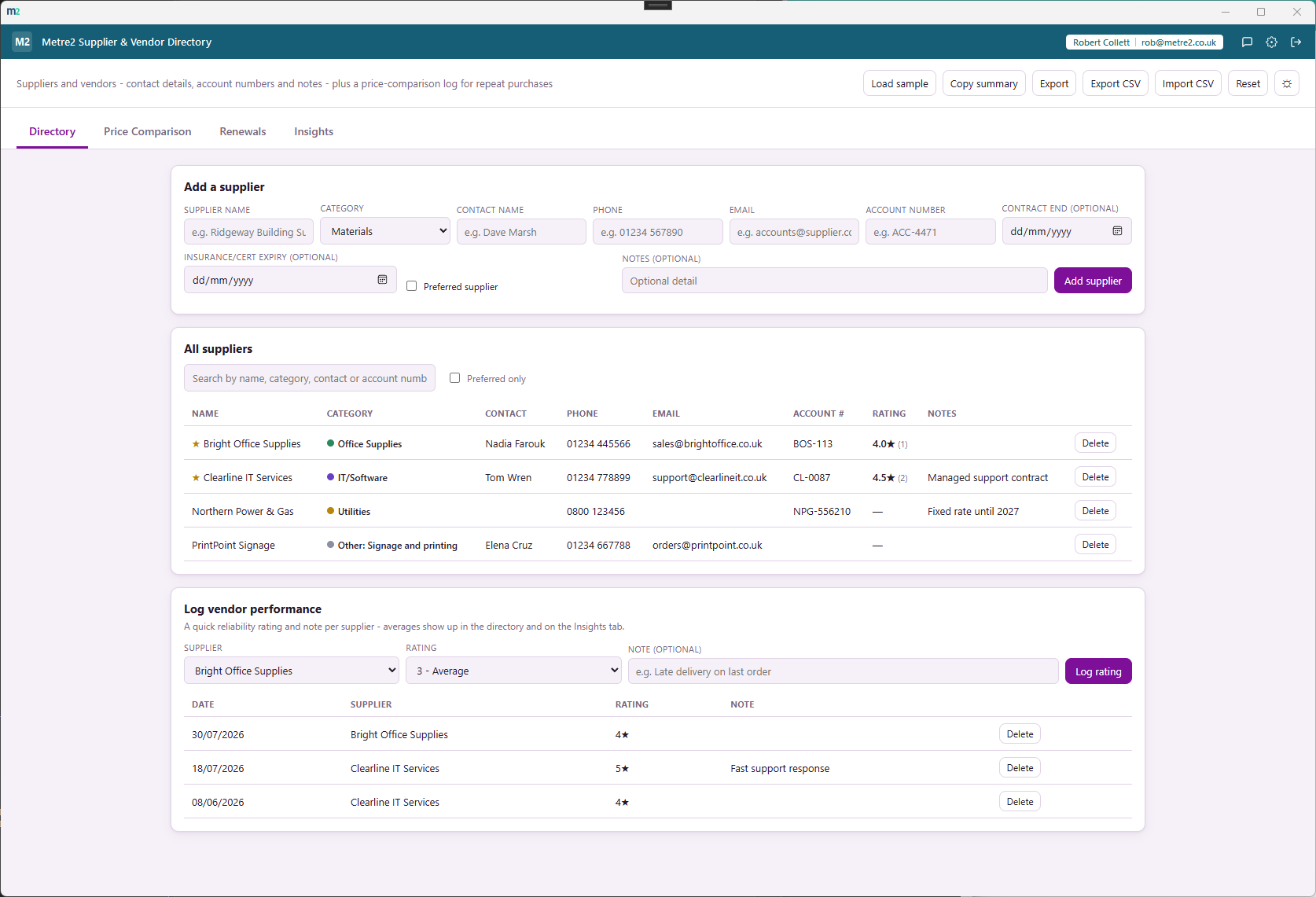
Contact details, account numbers and notes
Every supplier records a contact name, phone, email, account number and optional
notes - one searchable directory instead of scattered emails and business cards.
Spend analytics and totals
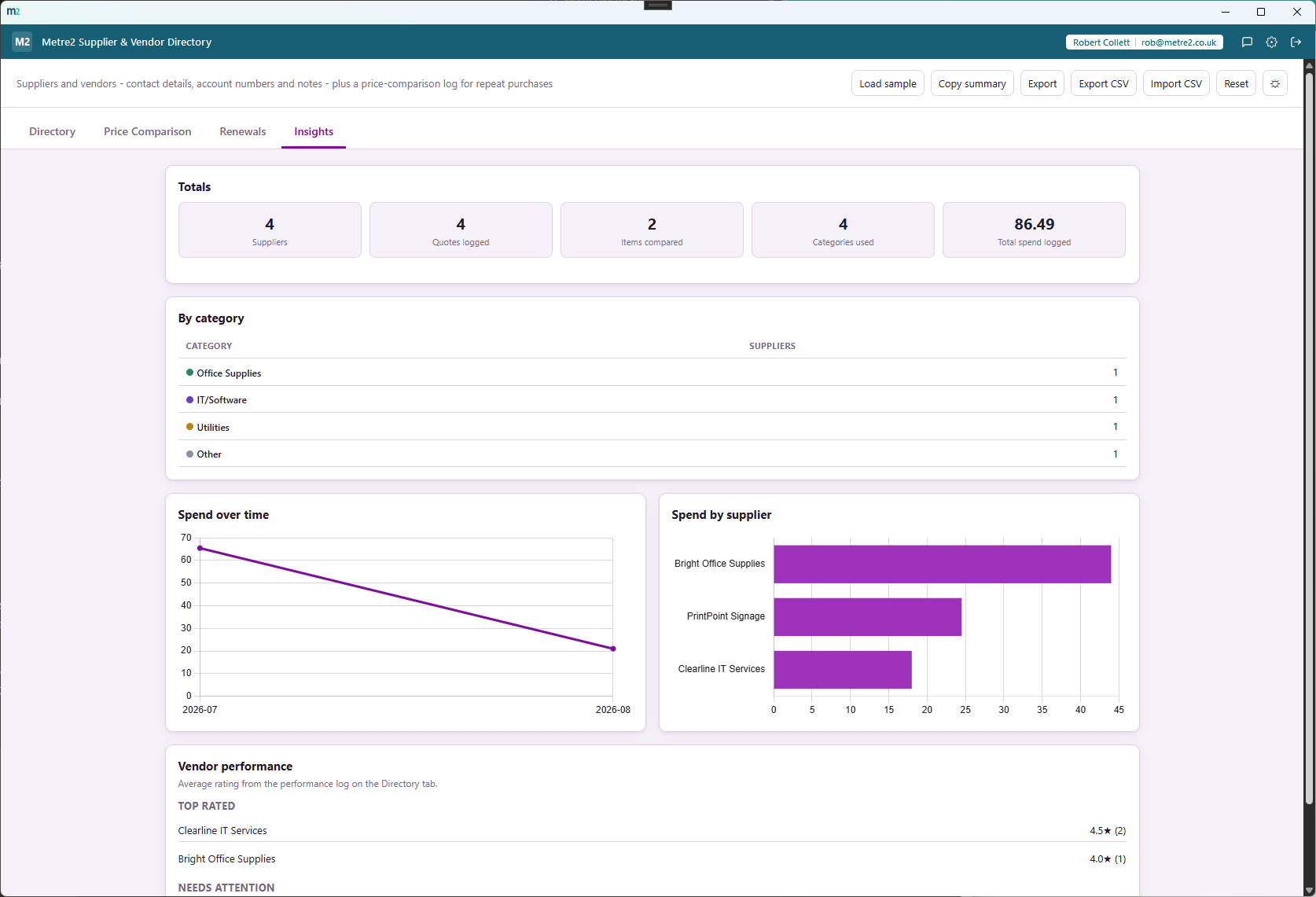
The Insights tab totals suppliers, quotes logged, items compared, categories used and
total spend logged, with spend-over-time and spend-by-supplier charts alongside a
per-category breakdown.
Vendor performance ratings
Log a quick 1-5 reliability rating and note per supplier - the average shows up in the
directory and in a top-rated / needs-attention list on Insights.
Contract & insurance renewal tracking
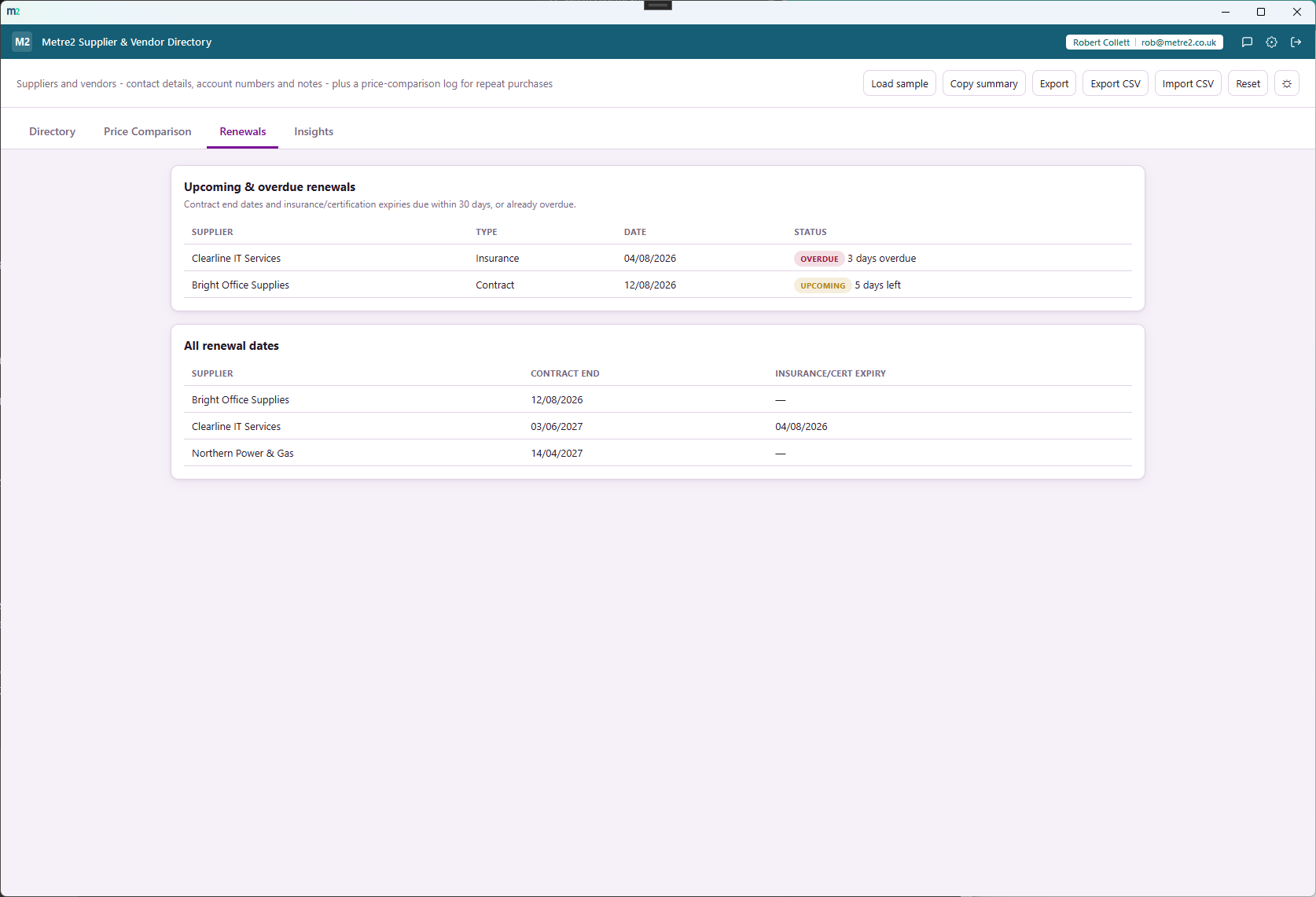
Set a contract-end and insurance/certification-expiry date per supplier, and the
Renewals tab flags anything overdue or due within 30 days.
Pricing alerts
A quote notably above a supplier's historical average is flagged as a price jump, and
items not requoted in over 180 days are flagged so nothing goes stale unnoticed.
Printable quote requests & CSV import/export
Print a blank quote-request sheet straight from the comparison view to get more
suppliers to bid, mark your best suppliers "Preferred", and export or bulk-import the
directory as CSV.
Searchable directory
Search by name, category, contact or account number - find the supplier you need
without scrolling through a long list.
A quote log tied to each supplier
Log a price quote against a supplier and an item in one form - every quote lands in a
searchable table, and feeds straight into the price-comparison view.
Copy summary or export HTML
Copy a plain-text summary of totals and the price comparison to the clipboard, or
export a standalone HTML file to keep or share.
Light/dark theme and rotating sample directories
Light/dark theme remembers your choice, and two rotating sample directories - each
spanning several suppliers, categories and price quotes - let you explore the
comparison view before adding your own.
How it compares to Precoro
Supplier and vendor management is usually sold as procurement software aimed at larger
purchasing teams. Here's how a focused, one-off desktop tool built specifically for a
supplier directory and price comparison compares to a small-business-friendly platform
like Precoro's.
Feature
Supplier & Vendor Directory
Precoro
Pricing model
£4.99 one-off after trial
Core plan from $499/month (billed annually)
Side-by-side per-item price comparison chips
✓
~
Simple supplier contact directory
✓
✓
Vendor performance ratings & renewal-date alerts
✓
~
Spend analytics dashboard
✓
✓
Works fully offline
✓
✕
Purchase order creation and approval workflows
✕
✓
ERP/accounting integrations
✕
✓
One account across a whole app portfolio
✓
✕
Comparison based on Precoro's publicly listed pricing and features as of August 2026
(precoro.com, TrustRadius, G2) - pricing and features change over time, so check
precoro.com for current details. Precoro is a trademark of its respective owner; this
comparison is for informational purposes and isn't sponsored by or affiliated with
Precoro.
Supplier & Vendor Directory, in practice
Frequently asked questions
What does the price comparison view actually show?
Every item with two or more logged price quotes, shown as a row of chips - one per supplier, sorted cheapest first - with the cheapest chip flagged "Best price". It's a direct side-by-side comparison, not a chart you have to interpret.
What information does each supplier record?
Name, category (Materials, Equipment/Plant Hire, Subcontractor, Professional Services, Utilities, IT/Software, Office Supplies, or a free-text "Other"), contact name, phone, email, account number and optional notes.
Does Supplier & Vendor Directory send purchase orders or connect to my suppliers?
No. It's a directory and price-comparison record-keeping tool - it keeps your supplier details and quoted prices in one searchable place, but it doesn't send orders, place orders, or connect to any supplier's own systems.
Is this only for construction/trade businesses?
No - any business that buys from suppliers can use it: a builder tracking material suppliers, an office comparing IT and stationery vendors, a retailer comparing wholesale suppliers. It's genuinely industry-agnostic.
Does my Supplier & Vendor Directory account work with Vector and Forma?
Yes - Supplier & Vendor Directory uses the same shared Metre2 account as Vector, Forma and every other Keystone app. Sign in once and it works everywhere.
Can I export or share the directory?
Yes - copy a plain-text summary of totals and the price comparison to your clipboard, or export a standalone HTML file to keep or share.
What does the Insights tab show?
Total suppliers, quotes logged, items compared, categories used and total spend logged, alongside a per-category breakdown, spend-over-time and spend-by-supplier charts, and top-rated / needs-attention vendor performance lists.
Can I track contract and insurance renewal dates?
Yes - the Renewals tab flags any supplier's contract-end or insurance/certification-expiry date that's overdue or due within 30 days, plus a full reference table of every date set.
Does it warn me about price rises?
Yes - a quote more than 15% above a supplier's historical average for that item is flagged as a "price jump", and any item that hasn't been requoted in over 180 days is flagged as stale, both on the Price Comparison tab.