Meeting notes with a running "still open" action tracker
Meeting Minutes & Action Tracker
Record what was discussed, who was there, and what needs to happen next - then let one
always-visible panel show you every outstanding action item across every meeting,
soonest due date first, with anything overdue flagged. Any industry, any team size.
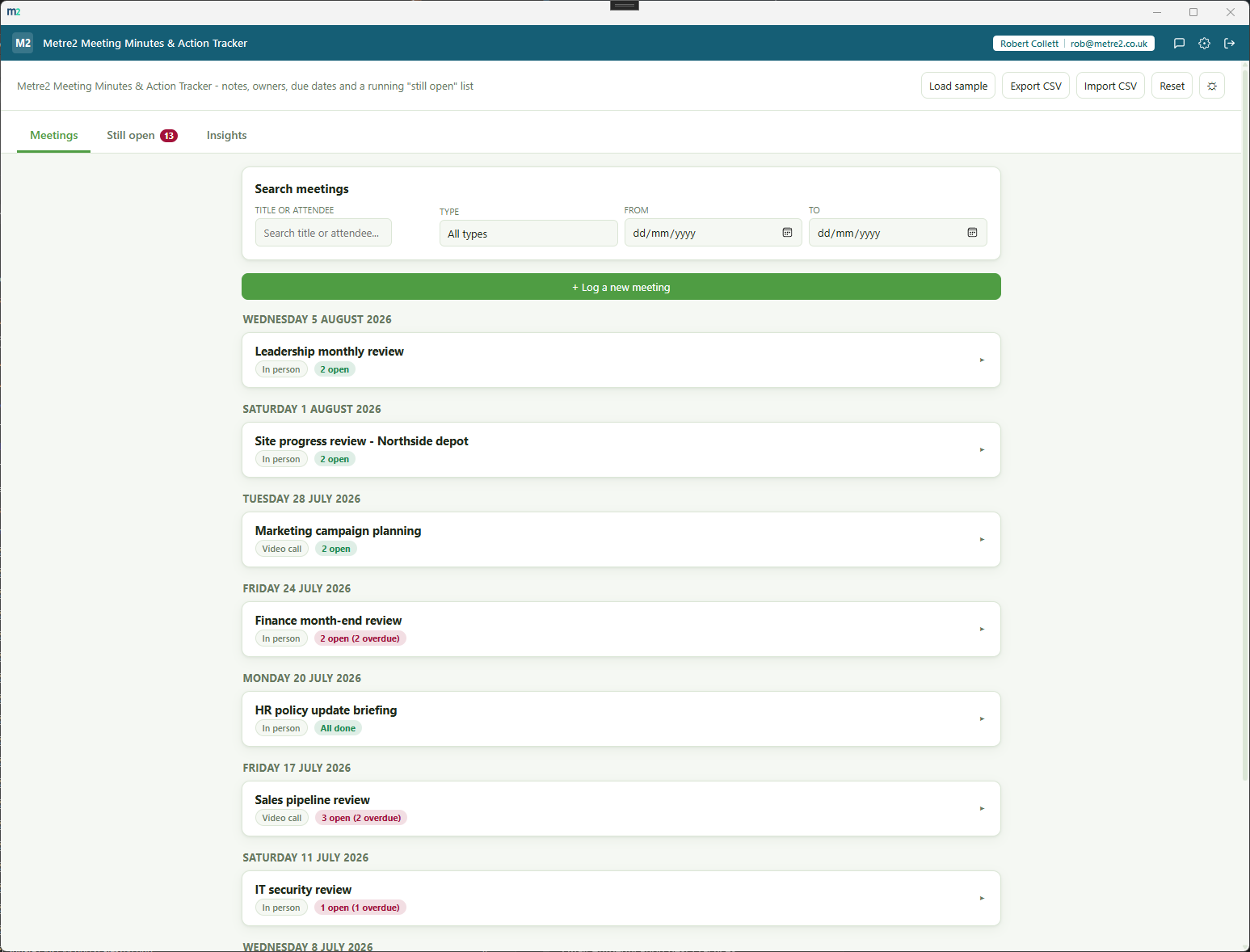
Meetings - grouped by date, most recent first, with a per-meeting open/overdue badge
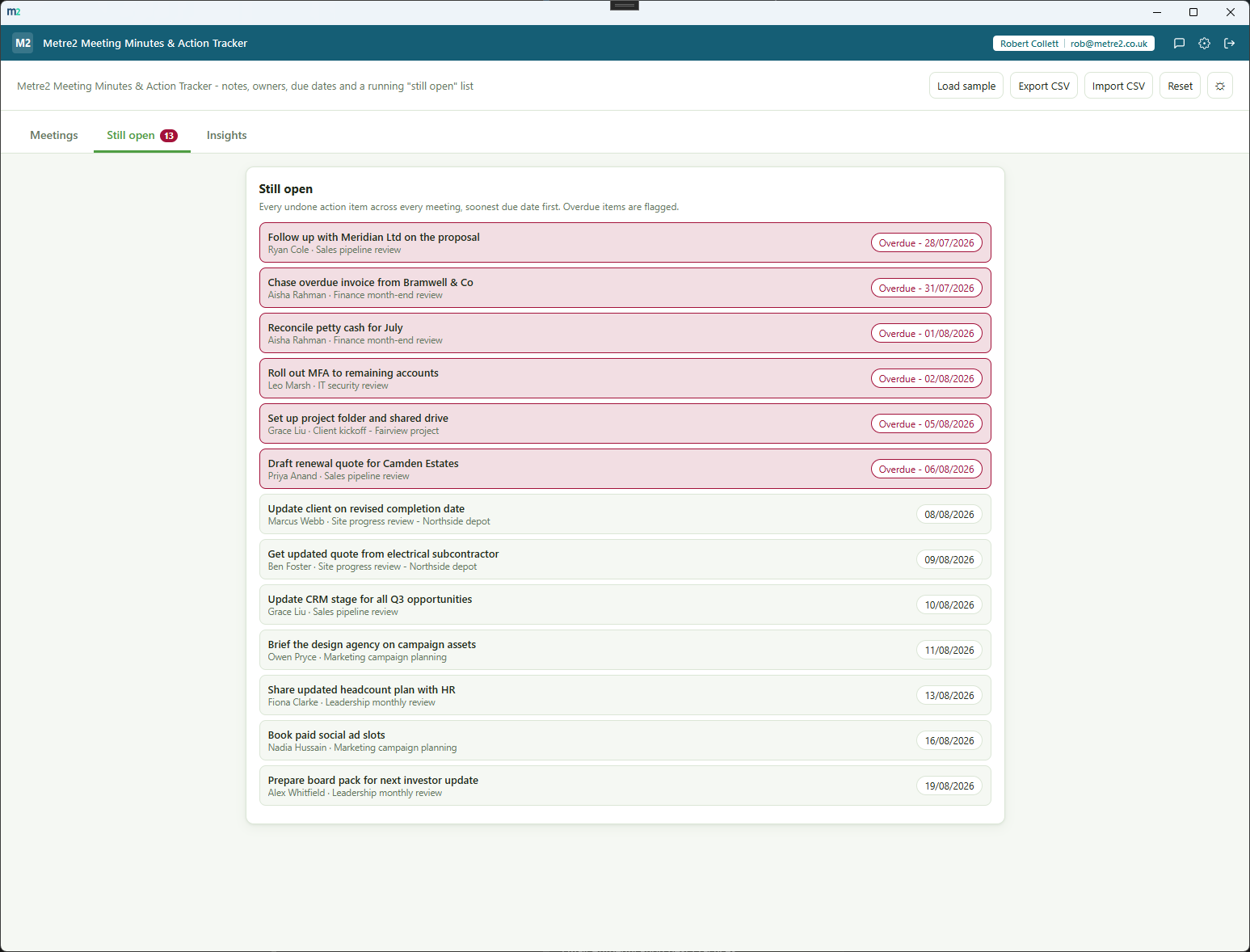
Still open - every outstanding action item across every meeting, overdue ones flagged
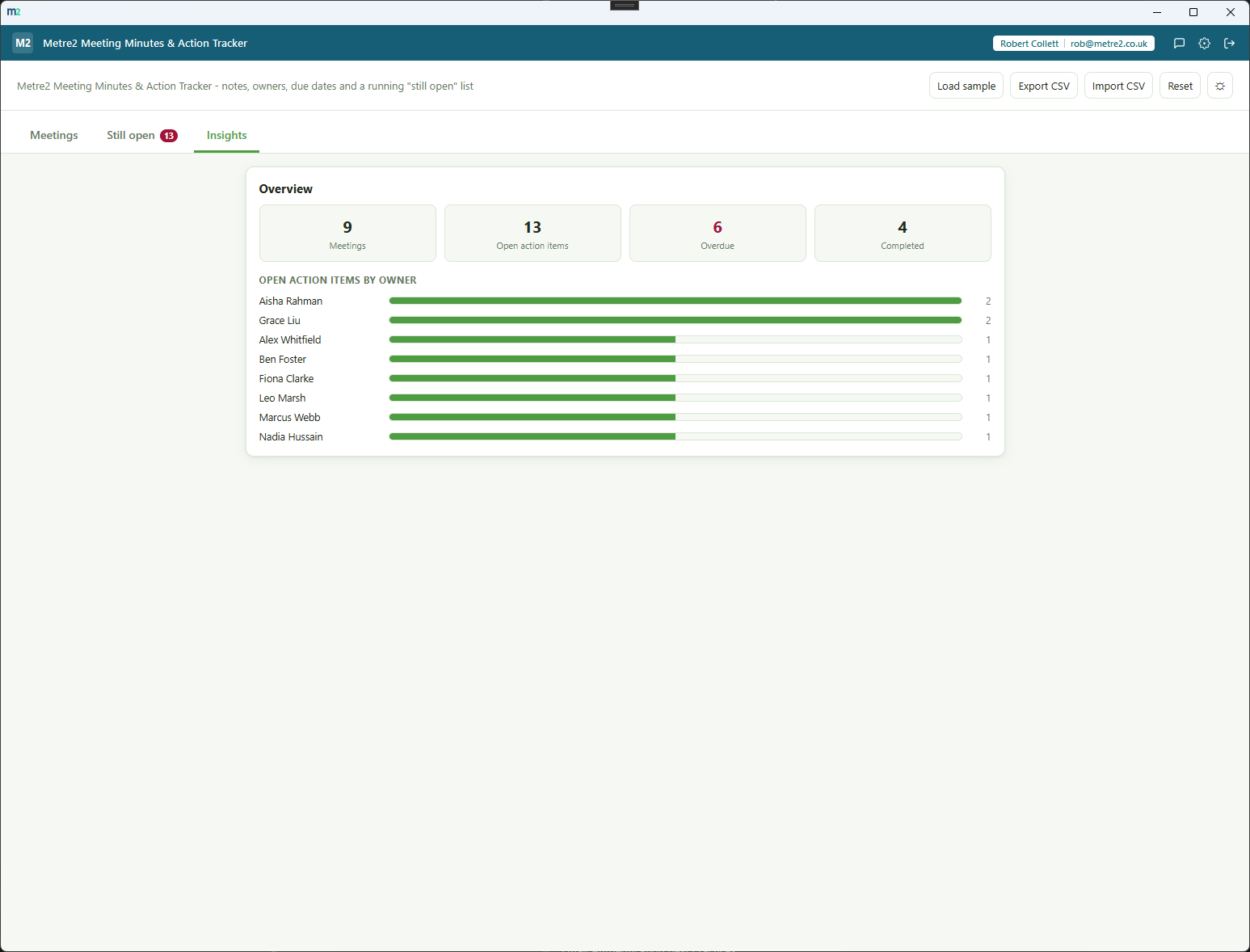
Insights - totals plus an open action items by owner breakdown
A running "still open" list, always visible
Every undone action item across every meeting, in one panel, sorted by due date with
overdue items flagged - no need to open each meeting to see what's outstanding.
A journal, not a table or a drawer
Meetings are grouped by date, most recent first, and each one expands inline to show
its notes, attendees and action items - it reads like a diary you can drill into.
Named owners, due dates, a done checkbox
Every action item has a free-text owner (any name, not a fixed staff list), an
optional due date and a simple done checkbox - nothing more complicated than that.
An overview that stays lightweight
Total meetings, total open action items, overdue count and a per-owner breakdown of
who currently has the most open items - a thin utility, not a project management suite.
Search and filter your meeting history
One search box matches title or attendee; a location/type filter and a from/to date
range narrow a long history down instantly.
In person, video call or phone
Every meeting carries a simple location/type field so you can see at a glance how a
catch-up happened, without free-typing it every time.
CSV export and import, action items included
Export every meeting and its action items to one CSV file, and import a CSV back in -
meetings and their action items round-trip cleanly, even a meeting with none yet.
A realistic sample journal, one click away
"Load sample" fills the journal with 9 meetings spanning several weeks, with a healthy
mix of done, open and overdue action items, so the "still open" list has real content
immediately.
Light or dark, your choice remembers itself
A one-click theme toggle that persists between sessions, matching the shared look and
feel across every Metre2 desktop app.
Works entirely offline
Everything lives in local storage on your device - no account, no server, no internet
connection required to use it day to day.
Any industry, any team size
No trade jargon, no construction framing - a weekly ops catch-up, a client kickoff, a
board review or a two-person check-in all fit the same simple model.
Genuinely thin, on purpose
No project management, no Gantt charts, no timesheets - just meeting notes, action
items and a running list of what's still open. Nothing more than that.
How it compares to notes scattered across email and Word
Most small teams keep meeting notes in email threads, a shared document, or a general
project-management tool that's overkill for "who said they'd do what by when." Here's how
a dedicated, focused tracker compares.
Feature
Meeting Minutes & Action Tracker
Trello / Asana
OneNote / a shared Word doc
Pricing model
£0.79 one-off after trial
Free tier, then per-user monthly subscription
Free with an existing Microsoft 365 subscription
Works fully offline
✓
✕ (cloud-hosted board)
✓ (with sync caveats)
A running "still open" list across every meeting, built in
✓
✕ (manual board/filter setup)
✕ (no concept of action items at all)
Purpose-built for meeting minutes, not a general board
✓
✕ (repurposed kanban/task board)
✕ (free text, no structure)
Journal view - meetings grouped by date, expandable
✓
✕
✕ (one long scrolling document)
CSV export/import, action items included
✓
✓ (varies by plan)
✕
No account required to set up, no per-user seats
✓
✕
✕ (needs a Microsoft 365 seat)
Comparison based on typical Trello/Asana free-and-paid tiers and typical OneNote/Word
meeting-notes usage as of August 2026 - features vary by plan and by how a team actually
uses each tool, so this is a general comparison rather than a specific product review.
Not sponsored by or affiliated with Trello, Asana, Microsoft OneNote or Microsoft Word.
Frequently asked questions
Do I need to install anything to use Meeting Minutes & Action Tracker?
Meeting Minutes & Action Tracker is a Windows desktop app. It is not yet available on the Microsoft Store - a Store listing is planned, but for now the app is built and ready ahead of submission.
What does a meeting record include?
Title, date, attendees (free-text list), location or type (In person, Video call or Phone), notes/summary, and a list of action items - each with its own text, owner, due date and a done checkbox.
What is the "still open" list?
A single always-visible panel listing every undone action item across every meeting you've logged, soonest due date first, with anything past its due date flagged as overdue. It's the fastest way to see what's outstanding without opening each meeting individually.
What does the layout look like?
A journal - meetings are grouped by date, most recent first, and each one expands inline to show its notes, attendees and action items. There's no slide-over drawer, no tab bar and no two-pane split; it reads like a diary you can drill into.
Can I assign action items to specific people?
Yes - every action item has a free-text owner field (a name, not a fixed list of staff), plus a due date and a done checkbox. The Overview panel also shows a per-owner breakdown of who currently has the most open items.
Can I search and filter meetings?
Yes - one search box matches meeting title or attendee, plus a location/type filter and a from/to date range, so a long meeting history stays quick to scan.
Can I import or export my meetings?
Yes - export every meeting and its action items to a single CSV file, and import a CSV back in. Meetings and their action items round-trip cleanly, including a meeting with zero action items.
Is there sample data to try it with?
Yes - "Load sample" fills the journal with 9 realistic meetings spanning several weeks, with a healthy mix of done, open and overdue action items, so the "still open" list has real content immediately.
Where does my data go?
Everything persists on your device between sessions - nothing is uploaded anywhere. The app works entirely offline with no server dependency, and data doesn't currently sync across multiple devices.