Name, company, role, phone, email, category and tags for every client and contact you
deal with, searchable and filterable in one table - with a light interaction log and a
manually-set last-contacted date so you can see who's gone quiet, plus lightweight
opportunity value/stage tracking and a follow-up task list. Not a full CRM: no
multi-stage deal pipeline, no kanban board.
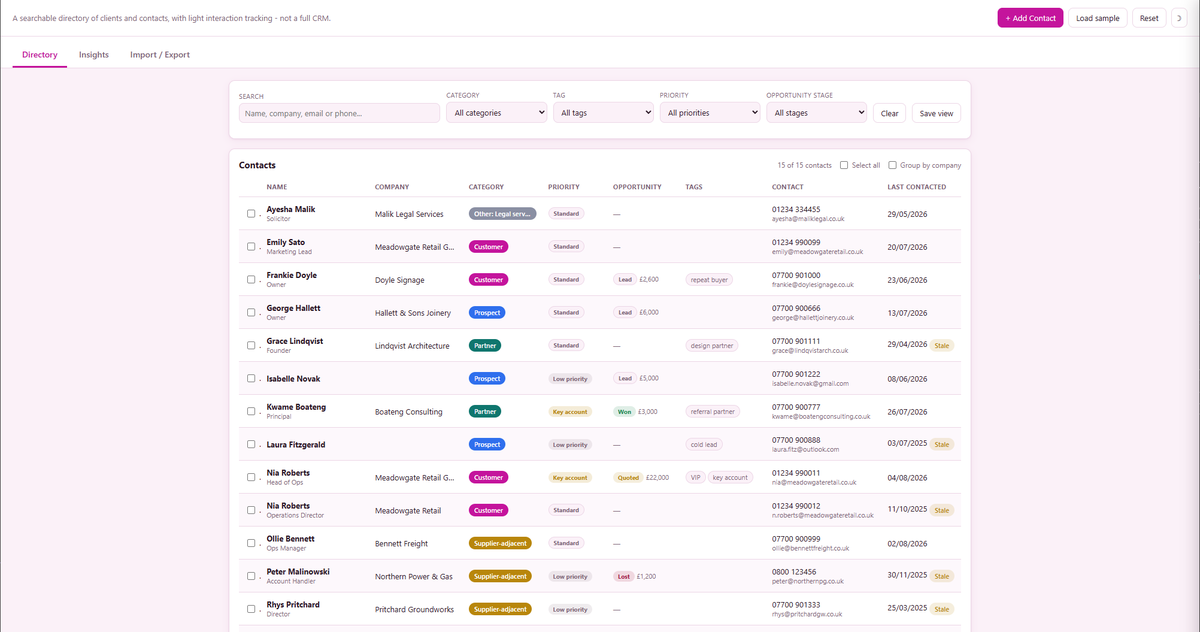
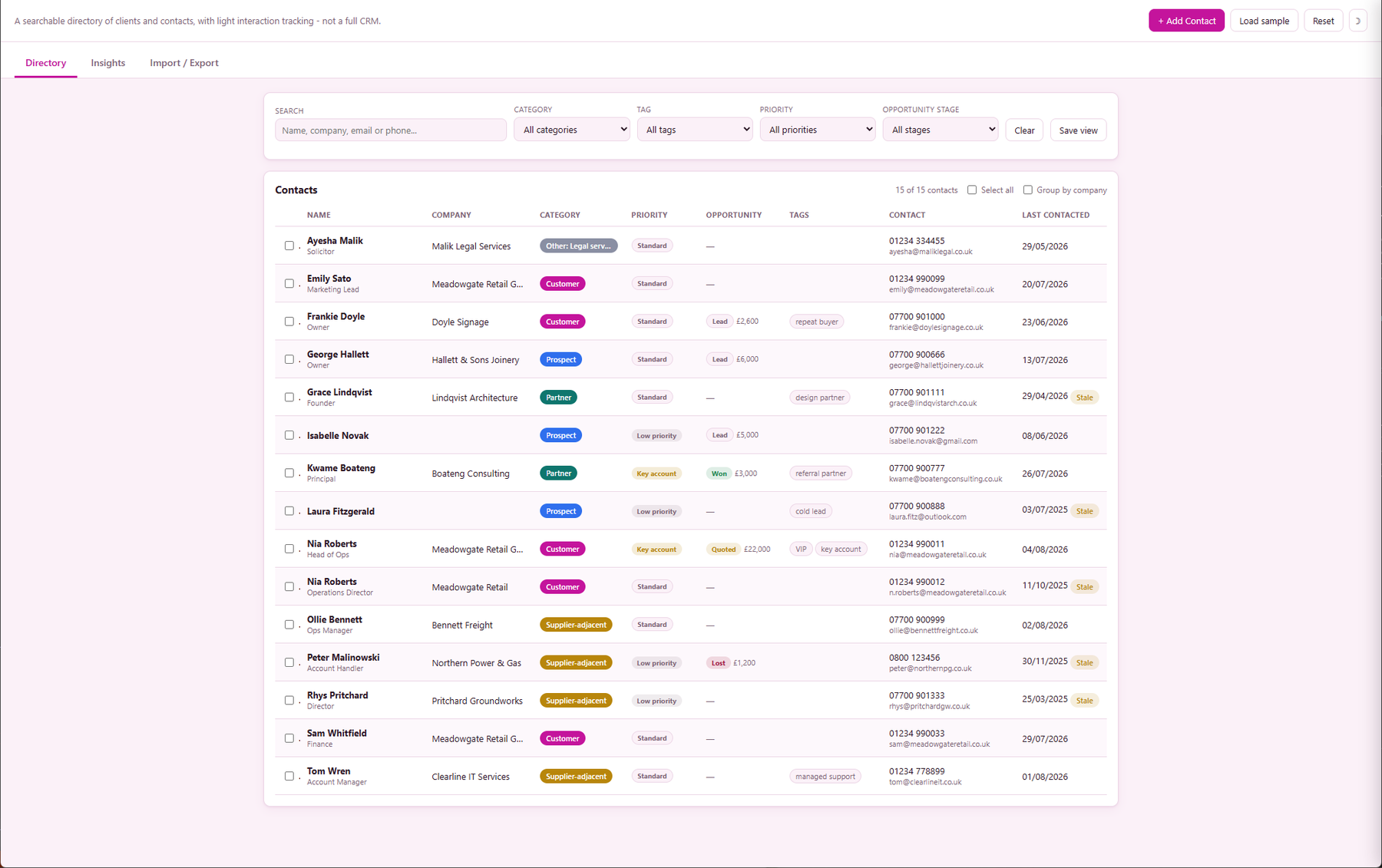
Directory - the full contacts table, searchable and filterable
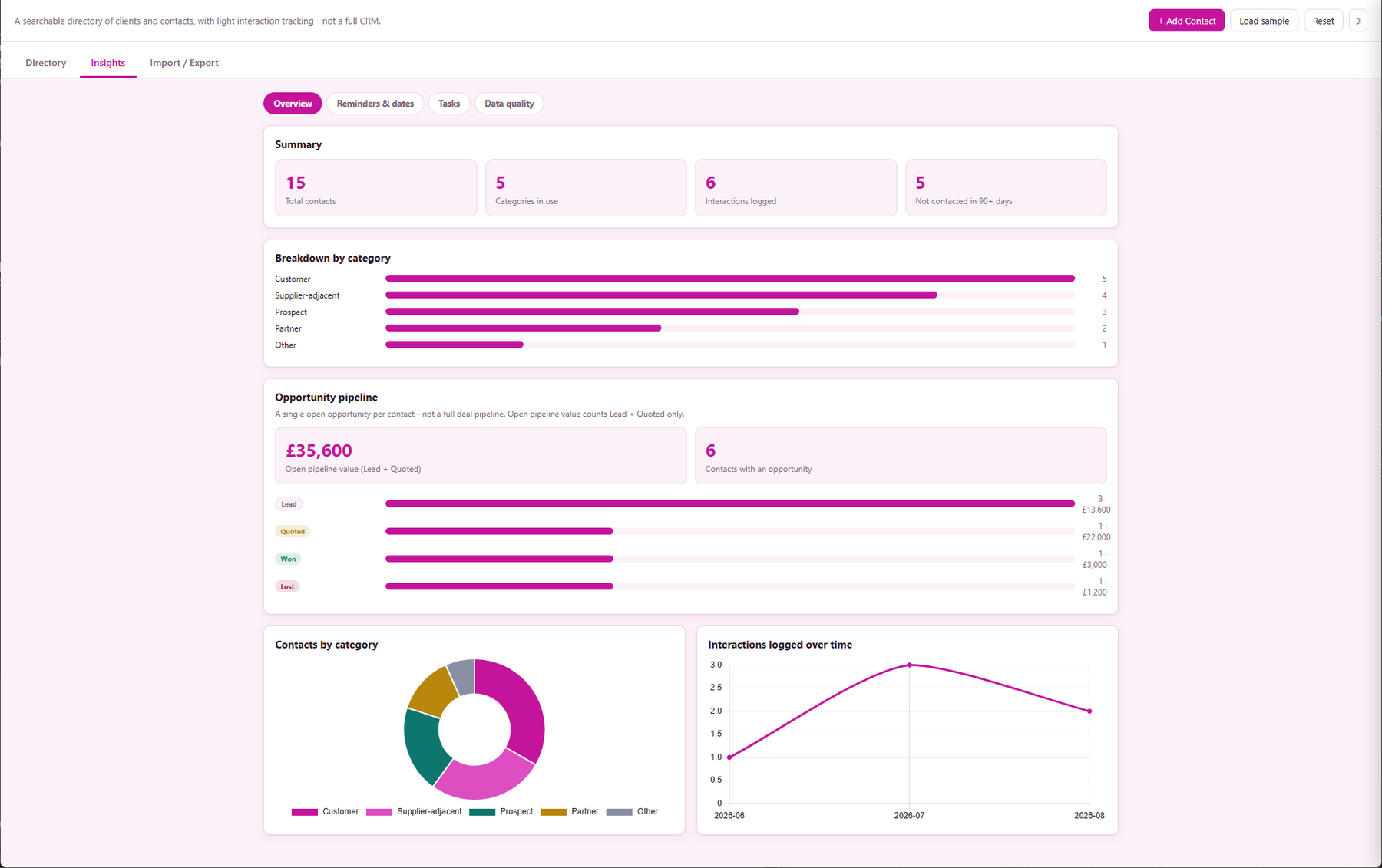
Insights Overview - summary stats, pipeline value and charts
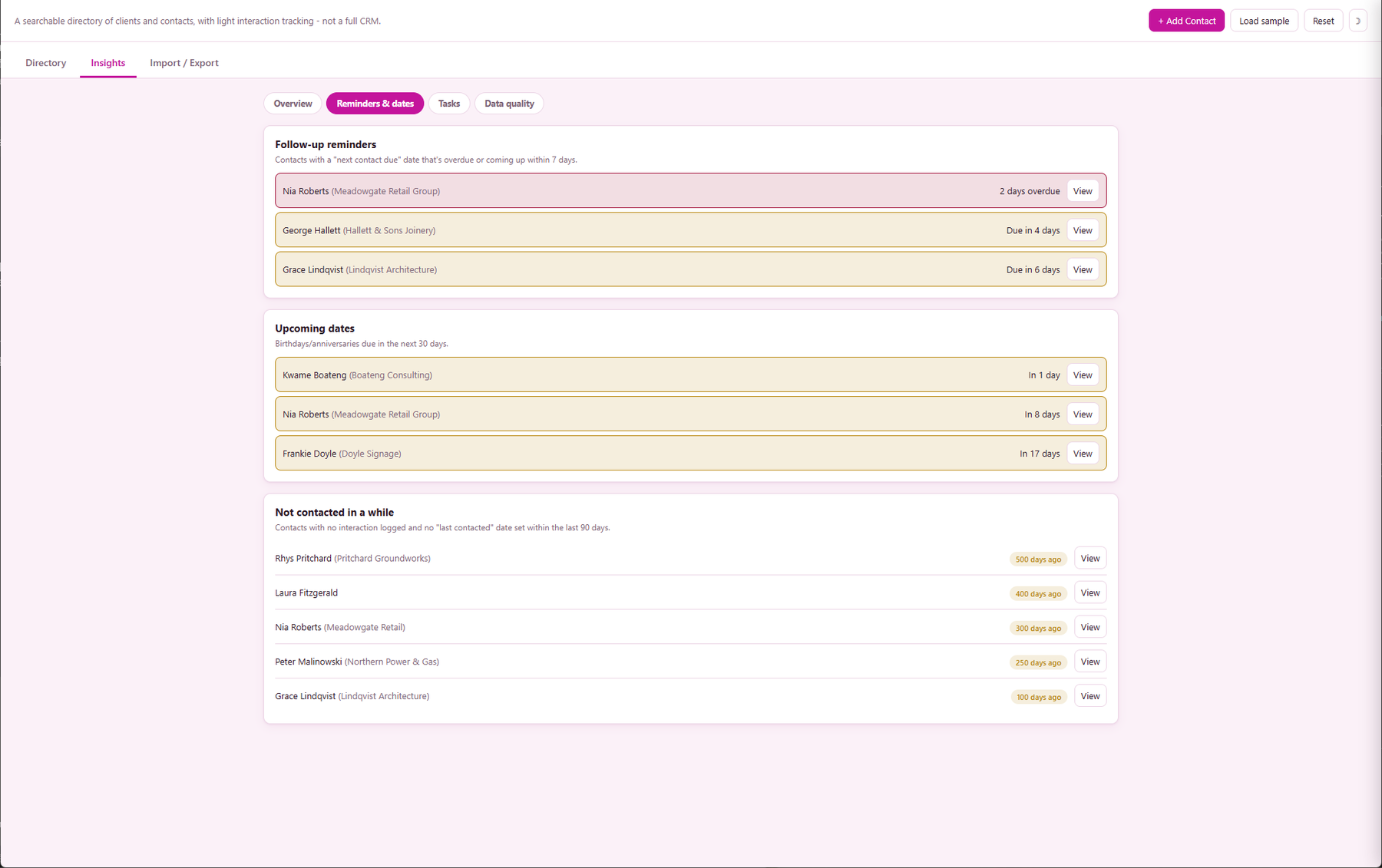
Reminders & dates - overdue follow-ups and upcoming dates
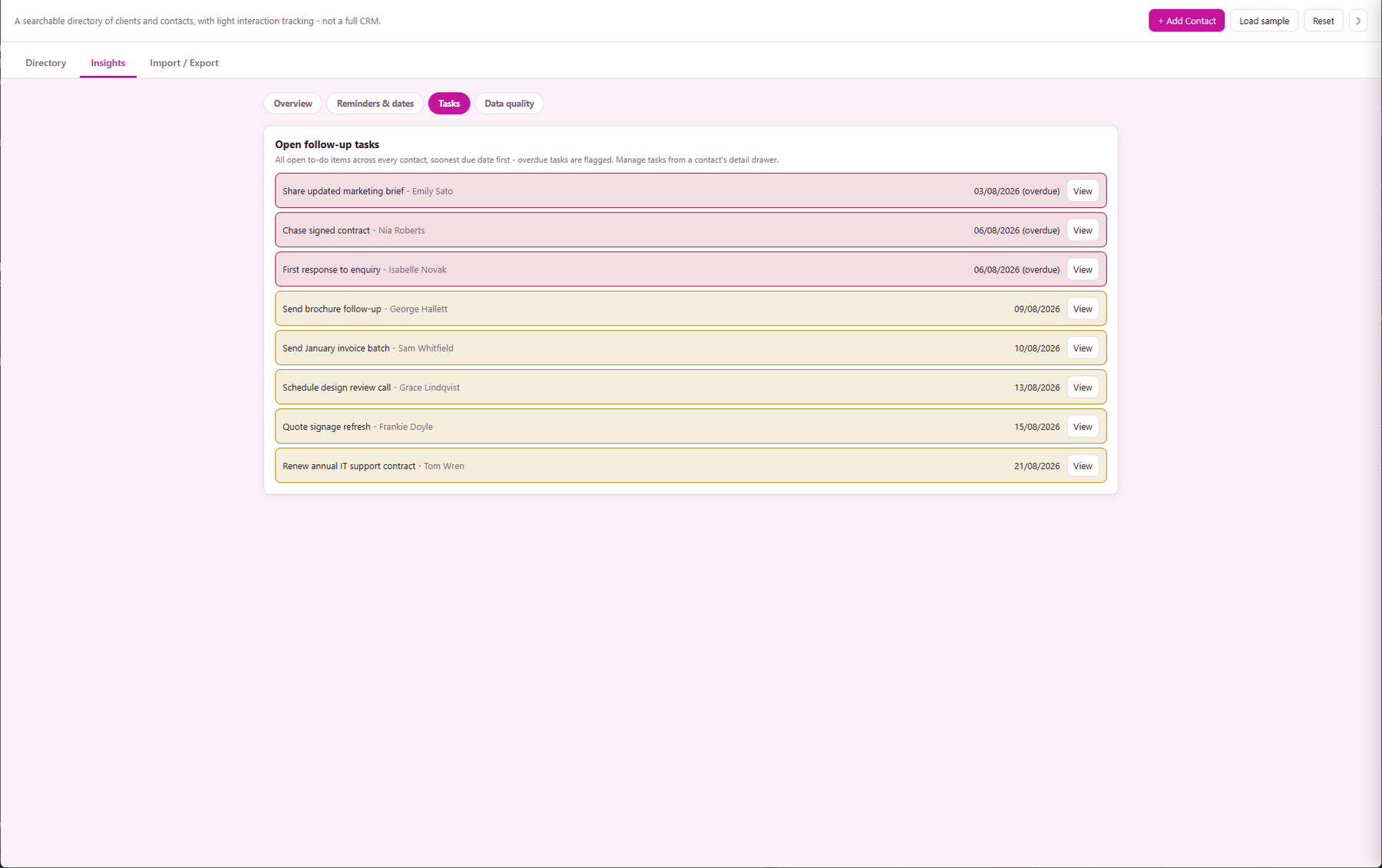
Tasks - every open follow-up task, soonest due date first
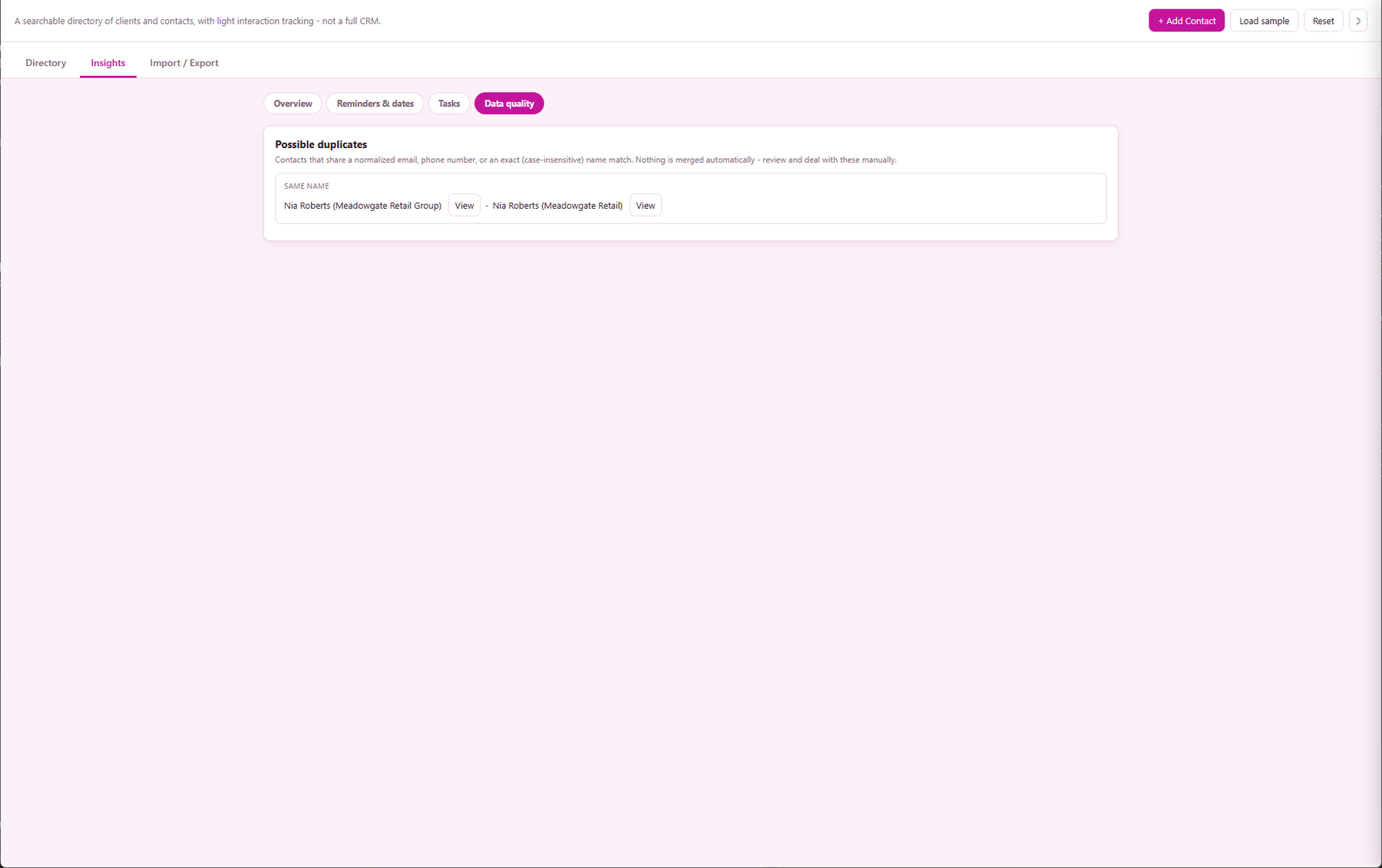
Data quality - possible-duplicate contacts flagged for review
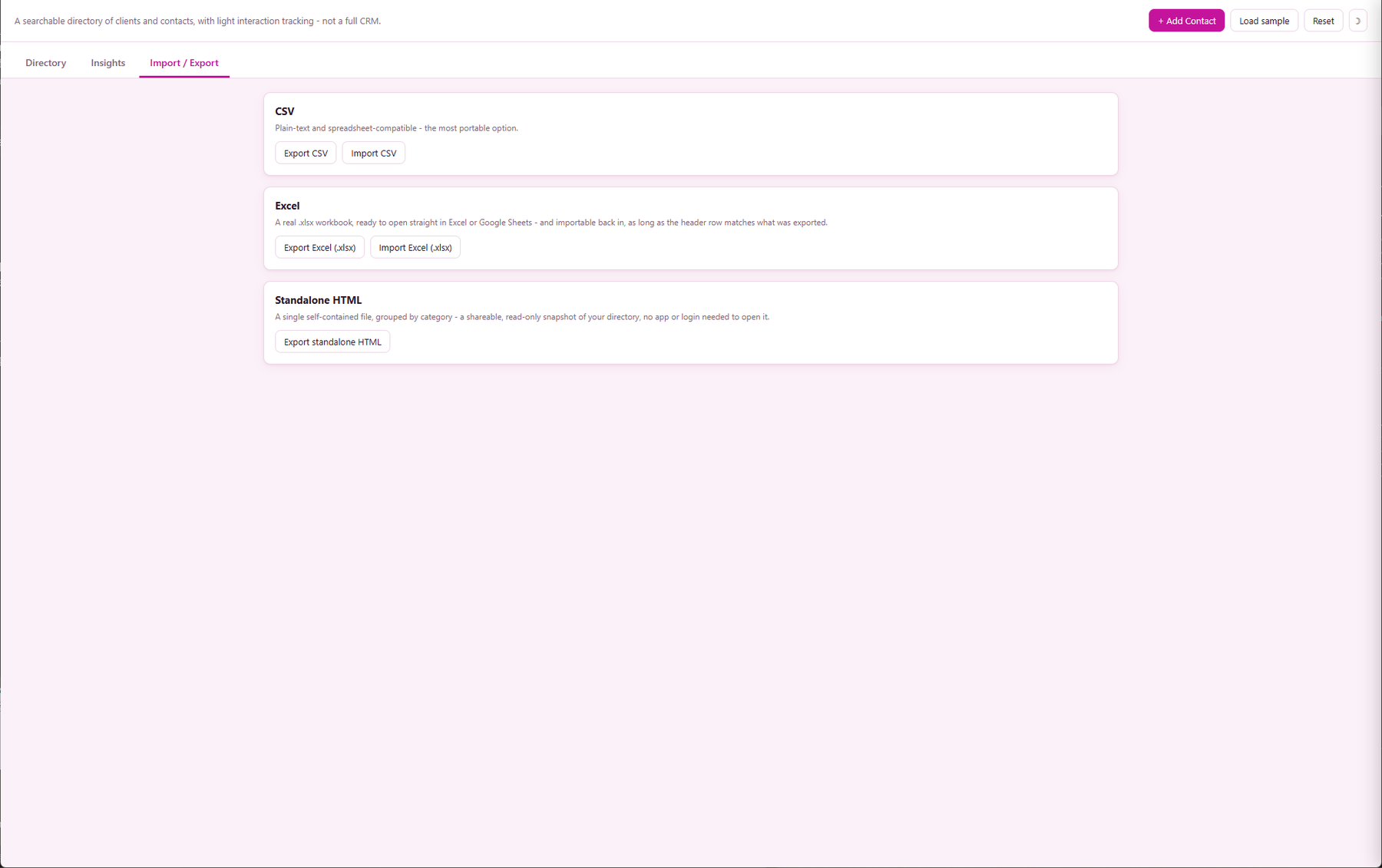
Import / Export - CSV, Excel (.xlsx) and standalone HTML
Search and filter, not scroll and squint
One search box matches name, company, email and phone at once, plus dropdown filters
for category and tag - a contact list of any size stays quick to work through.
A slide-over panel, not a page switch
Click any contact and a detail panel slides in from the side to add, edit or review
them - the table underneath never disappears, so you never lose your place in a long
list while you work on one record.
A fixed set of categories, plus your own
Customer, Prospect, Partner or Supplier-adjacent covers most contacts out of the box -
pick Other and add your own label for anything that doesn't fit, the same
fixed-set-plus-Other pattern used across the rest of the Metre2 portfolio.
Lightweight free-text tags
Tag contacts however suits you - "VIP", "repeat buyer", "referral source" - and filter
the whole directory down to just that tag in one click. No fixed tag list to fight.
A genuinely thin interaction log
Log a Call, Meeting, Email or Other against a contact with a date and a short note -
a running history, kept separate from the follow-up task list and opportunity tracking
below. No multi-stage deal pipeline, no kanban board.
See who's gone quiet
The Insights tab flags anyone with no interaction logged and no last-contacted date in
the last 90 days, so contacts don't silently fall off your radar.
Import / Export tab: CSV, Excel and standalone HTML
Bring an existing spreadsheet contact list in with one CSV or Excel (.xlsx) import, or
export the whole directory out three ways - a CSV file, a real Excel (.xlsx) workbook,
or a self-contained standalone HTML snapshot anyone can open with no app or login. Your
data is never locked in.
Any business, any industry
Not construction-gated - a plain client and contact directory that works for any small
business, freelancer or team, whatever they sell.
Follow-up reminders that don't get lost
Set an optional "next contact due" date on any contact. The Insights tab lists what's
overdue and what's coming up in the next 7 days, one click from each contact's panel.
Group by company
Flip a toggle to switch the table into collapsible per-company groups, each with a
contact count, and a "(No company)" bucket for anyone without one on file.
Priority ratings that surface what matters
Mark any contact Key account, Standard, or Low priority - shown as a small badge in the
table and filterable in one click, so your most important relationships stand out.
Possible-duplicates panel
A pure matching pass flags contacts sharing a normalized email, phone number, or an
exact name match, listed for you to review on the Insights tab - nothing is ever
merged automatically.
Printable contact card
Open a contact and hit Print for a clean, print-ready summary - name, company, role,
contact details, category, tags, priority, notes and recent interactions.
Saved filter views
Combine a search with category, tag and priority filters, then save that exact
combination as a named view - re-apply it with one click from the toolbar any time.
Insights charts
Two charts on the Insights tab - contacts by category, and interactions logged per
month - so patterns in your directory and activity are visible at a glance.
Birthday and anniversary tracking
Set an optional birthday or anniversary date per contact. The "Upcoming dates" callout
on Insights lists anything due in the next 30 days, so a thoughtful message is never a
surprise you missed.
Opportunity value and stage, not a pipeline
Give any contact a single open opportunity - a value plus a Lead/Quoted/Won/Lost stage -
shown as a badge in the table and filterable. Insights totals your open pipeline value
(Lead + Quoted) with a per-stage breakdown. Still no deal history, multiple opportunities
per contact, or a kanban board.
A follow-up task list, alongside the reminder date
Add as many open-ended to-do items as a contact needs - text plus a due date - from the
detail drawer. An Insights "Tasks" subtab lists every open task across your whole
directory, soonest due date first, with overdue ones flagged and a link straight back to
the contact.
Bulk actions on the contacts table
Tick a row - or "select all" - to reveal a bulk-action bar: add or remove a tag, set
category, set priority, or export just that selection to CSV or Excel. No need to open
contacts one at a time to make the same change across several of them.
How it compares to a spreadsheet or a free CRM-lite tool
Most small businesses track contacts in a spreadsheet, or reach for a free tier of a
general-purpose CRM tool. Here's how a dedicated, focused contact book compares for
someone who just wants a directory - not a sales pipeline.
Feature
Customer Contact Book
Spreadsheet / free CRM-lite tool
Pricing model
£0.79 one-off after trial
Free spreadsheet, or a CRM's free tier with upsell prompts
Works fully offline
✓
✕ (most CRM-lite tools are cloud-only)
Built-in search across name, company, email, phone
✓
✕ (manual sort/filter in a spreadsheet)
No multi-stage pipeline to configure - just an optional value/stage badge
✓
✕ (most CRM-lite tools push you toward one)
Staleness flag for contacts gone quiet
✓
✕
CSV import and export
✓
✓
Follow-up reminders (overdue/upcoming)
✓
✕ (manual tracking, or a full CRM's task module)
Possible-duplicate contact detection
✓
✕
Single-purpose, no unrelated modules to learn
✓
✕ (CRM-lite tools bundle email, tasks, reporting)
Comparison based on typical spreadsheet contact tracking and free tiers of general-purpose
CRM-lite tools as of August 2026 - features vary by product, so this is a general
comparison rather than a specific product review. Not sponsored by or affiliated with any
spreadsheet application or CRM vendor.
Frequently asked questions
Do I need to install anything to use Customer Contact Book?
Customer Contact Book is a Windows desktop app. It is not yet available on the Microsoft Store - a Store listing is planned, but for now the app is built and ready ahead of submission.
Is this a CRM?
No - it's deliberately lighter than a CRM. There's no multi-stage deal pipeline and no kanban board - each contact can carry at most one simple opportunity value/stage, not a full deal record. It's a searchable contact directory with a thin interaction log and a manually-set last-contacted date, aimed at anyone who just needs to keep track of who they've spoken to and when.
What fields does each contact have?
Name, company, role/title, phone, email, address, a category (Customer, Prospect, Partner, Supplier-adjacent, or a free-text Other), free-text tags, notes, and a last-contacted date you set yourself.
How does the interaction log work?
Open any contact and log a short dated entry - Call, Meeting, Email or Other, plus a note - from the same panel. It's a running history against that contact, not a task or follow-up scheduler.
What counts as "not contacted in a while"?
The Insights view flags any contact with no interaction logged and no last-contacted date set within the last 90 days. It uses whichever is more recent - the manual date or the latest logged interaction - so a quick call you log takes a contact off the stale list without you having to also update the date field.
Can I import or export my contacts?
Yes - export the full directory to a CSV file, and import contacts from a CSV file with the same column layout. Useful for moving contacts in from a spreadsheet, or backing up your list.
Can I export to and import from Excel?
Yes - the Import / Export tab has a one-click Excel (.xlsx) export that opens straight in Excel or Google Sheets, and you can import a workbook straight back in too, alongside CSV export/import and a standalone HTML export you can share with anyone.
Where does my data go?
Everything persists on your device between sessions - nothing is uploaded anywhere. Data doesn't currently sync across multiple devices.
Can I set follow-up reminders?
Yes - set an optional "next contact due" date on any contact. The Insights tab lists anything overdue and anything due within the next 7 days, each one click away from that contact's detail panel.
Does it flag duplicate contacts?
Yes - a "possible duplicates" panel on the Insights tab flags contacts that share a normalized email address, a normalized phone number, or an exact (case-insensitive) name match. Nothing is ever merged automatically - it's a review list so you can deal with duplicates yourself.
Can I rate how important a contact is?
Yes - a simple 3-tier priority (Key account, Standard, or Low priority) shows as a badge in the table and can be filtered alongside category and tag.
Can I print a contact's details?
Yes - the "Print" button in a contact's detail panel opens a clean, print-ready summary card with their name, company, role, phone, email, address, category, tags, priority, notes and recent interactions.
Can I track sales opportunities against a contact?
Yes, in a lightweight way - each contact can carry a single open opportunity, a value plus a stage (Lead, Quoted, Won or Lost), shown as a badge and filterable. Insights totals your open pipeline value (Lead + Quoted) and gives a per-stage breakdown. It's still not a full deal pipeline or kanban board - one value and one stage per contact, not a multi-stage deal record.
Can I set more than one to-do against a contact?
Yes - alongside the single "next contact due" date, each contact can hold as many open-ended follow-up tasks as you need (a short text plus an optional due date), added and ticked off from the detail panel. A dedicated Tasks view on Insights lists every open task across your whole directory, soonest due date first, with overdue ones flagged.
Can I update several contacts at once?
Yes - tick the checkboxes on the contacts table (or use "select all") and a bulk-action bar appears, letting you add or remove a tag, set category, set priority, or export just that selection to CSV or Excel, all in one go.